
Session Management

Plan Complex Event Agendas Without Track-Planning Chaos

Build multi-day schedules, organize sub-sessions, control room capacity, and run live engagement from one operational layer built for event teams.

Visual timeline scheduling Sub-sessions and breakout control Live polls, Q&A, and AI recap
50,000+ sessions scheduled Built for multi-stage events
Agenda Builder Reschedule tracks without rebuilding the day
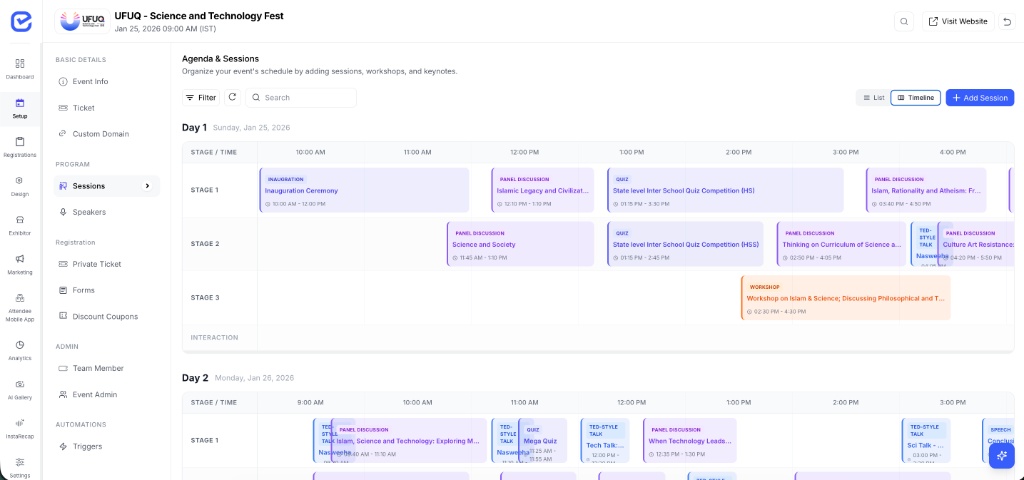
EventHex session management timeline view
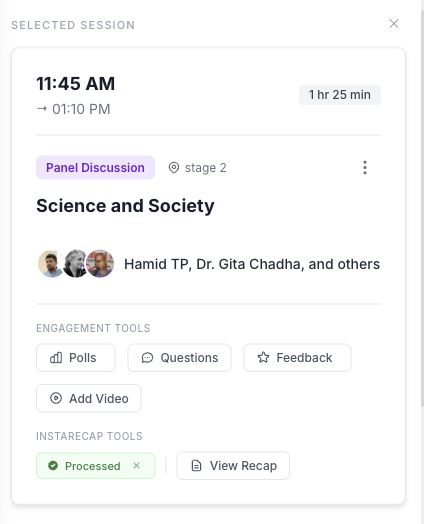
EventHex session detail panel
Live Session Ops Polls, Q&A, feedback, and recap status in one panel
500+ multi-track events
98% scheduling accuracy
Live session-level engagement

Keep agenda planning, session access, and live attendee signals inside one event workflow

50,000+ Sessions scheduled
500+ Multi-track events run
98% Scheduling accuracy
4.9/5 Organizer satisfaction

Agenda Planning, Session Access & Live Engagement

The same EventHex animated bento system, now focused on multi-track agenda building, session controls, and in-session engagement workflows.

Rich Session Details

Keep titles, formats, rooms, speaker slots, tags, and internal notes inside one structured session record.

AI Session Import

Bring in draft agenda details fast and let AI prefill session titles, formats, and descriptions with less manual setup.

Imported

Session Types & Ordering

Define keynotes, panels, workshops, and breakouts, then drag to shape the right event flow before publishing.

Keynote Panellist Presenter

Session Communication

Coordinate reminder emails, WhatsApp updates, and material requests from the same session workflow.

Multi-Language Agendas

Manage session titles and agenda content in multiple languages for international conferences and mixed audiences.

EN عربي हिन्दी FR Aa

Visual Timeline View

See all sessions on a color-coded timeline. Switch between days and stages at a glance.

Day 1 Day 2 Day 3 9 AM 10 AM 11 AM 12 PM

Sub-Sessions & Breakouts

Create nested sessions under any parent—workshops, panels, multi-track conferences.

Panel Talk WS

Ticket-Restricted Sessions

Limit session access to specific ticket types with maximum booking caps.

VIP Pass Required All Access • Open

Multi-Stage Management

Manage multiple stages, assign sessions to venues, group by stage or type.

Stage A Stage B Stage C

Drag-and-Drop Scheduling

Reschedule sessions by dragging to new time slots with conflict detection.

9 AM 10 AM 11 AM

Live Polls

Run real-time polls during sessions and show results instantly to drive participation.

Live Poll Results Remote Work 67% In-Office 22% Hybrid 11%

Audience Q&A

Built-in Q&A with upvoting—surface the most popular questions for speakers.

Audience Questions 24 12 8

Session Feedback

Collect star ratings and written feedback immediately after every session.

Session Rating 4.8 /5 142 ratings

AI InstaRecap

AI transcribes sessions and delivers personalized notes, takeaways & highlights.

AI Transcription Processing... AI Summary

Agenda Pages & Widgets

Publish clean public agenda blocks for your event website and keep session information synced as schedules evolve.

Key features that keep session operations under control

Everything you need to shape, protect, and activate
your event agenda

Agenda control

Visual timeline scheduling that stays usable when agendas get dense

Build multi-day, multi-room agendas with a view that stays readable for event teams, speakers, and operators. Session edits happen where the schedule already lives, not in disconnected tools.

  • See stages side by side to spot clashes before they affect attendees.
  • Drag sessions into new slots when speakers change or rooms shift.
  • Keep color-coded session types visible for faster agenda review.
See it in a demo
EventHex agenda timeline
Session structure

Support every format from keynotes to breakout-heavy workshop flows

Create parent sessions, sub-sessions, and specialized formats so the published agenda matches the real shape of the event instead of flattening it into generic blocks.

  • Keynotes, panels, labs, workshops, and sponsor sessions in one model.
  • Nested sub-sessions for breakouts and themed track branches.
  • Role assignment for speakers, moderators, and session owners.
See it in a demo
Session types 4 active patterns
Keynote Main-stage address
Panel Moderator + guests
Workshop Capacity-managed
Breakout Nested under track
Innovation Track
Breakout A Breakout B Breakout C
Capacity and access

Use registration data to control who can enter what and when

EventHex connects ticket rules and session-level attendance so premium access, limited-capacity rooms, and waitlists stay operationally sound.

  • Restrict attendance by ticket class, invite list, or participant segment.
  • Set hard caps and keep overflow demand on structured waitlists.
  • Notify the right attendees when seats open or rooms change.
See it in a demo
Session access Rules applied
VIP Ticket only
Standard pass + waitlist
Workshop Lab 38/40
Breakout Room C 22/30
Sponsor Roundtable 12/12
Live engagement and recap

Keep interaction, feedback, recording, and AI summary in the same session workflow

Moderators can run live tools while ops teams monitor response, recording, and recap completion. Nothing needs to be copied into a separate post-event system.

  • Live polls and Q&A without leaving the session control panel.
  • Emoji reactions and star ratings for immediate session sentiment.
  • InstaRecap transcripts, summaries, and translations after the recording ends.
See it in a demo
Session Planning Without Loose Ends

Ready to run your next agenda from one coordinated workflow?

Bring scheduling, access rules, live engagement, and recap into a single session layer so your ops team stays faster before and during the event.

Visual timeline builder Capacity-aware registrations Live polls and AI recap
Free onboarding support No credit card required Built for conferences and summits
Operational Support

Effortless session coordination

Keep rooms, registrations, reminders, and agenda publishing connected so your event team can scale session operations without creating extra layers of admin work.

Multi-stage control

Run agendas across unlimited rooms and stages while keeping speaker assignments, room notes, and schedule changes synchronized in one place.

Access-aware registration

Connect session eligibility, capacity, waitlists, and reminders so high-demand sessions stay structured even when demand spikes.

Agenda publishing and follow-up

Present agendas in attendee-friendly formats, then carry recordings and AI recaps forward without rebuilding the session record later.

Need a custom session setup?

Frequently asked questions

We help event teams structure agenda logic, access rules, session-level communication, and live recap workflows around the way their programs actually run.

Included with every rollout
  • Agenda blueprinting for multi-track programs
  • Session access rules, capacity setup, and waitlists
  • Live engagement, recording, and recap readiness
Free onboarding support Map your agenda workflow before launch and keep your event team aligned on the live operating model.
Plan my session flow
What is session management software?

Session management software helps event organizers plan, schedule, and coordinate all sessions, workshops, and keynotes across multiple days and stages from a single dashboard with visual timeline views.

Can I manage sessions across multiple stages and days?

Yes. EventHex supports unlimited stages, rooms, and days. Each stage gets its own timeline track so your team can review schedules side by side, resolve clashes early, and keep the agenda coherent as the event grows.

What are sub-sessions and breakout rooms?

Sub-sessions are nested sessions created under a parent session. They are useful for workshops that split into groups, panel discussions with parallel tracks, or conferences with themed breakout streams that still belong to one larger program.

Can I restrict sessions to specific ticket types?

Yes. You can limit session access to specific ticket types or participant categories, set maximum capacity per session, and maintain waitlists when a room fills up. That makes it practical to manage VIP workshops, sponsor-only sessions, or premium add-ons.

How does drag-and-drop scheduling work?

The visual timeline lets your team move sessions between time slots or stages with direct drag-and-drop edits. Changes are reflected in the same planning view so operators can reschedule quickly without rebuilding the rest of the agenda.

What live engagement tools are available during sessions?

EventHex includes live polls with real-time analytics, Q&A with spotlight mode for fullscreen projection, emoji reactions, star ratings, and session feedback tools that attendees can use from their phones during the event.

Can sessions be recorded and transcribed automatically?

Yes. EventHex's InstaRecap workflow can pair recordings with AI-generated transcripts, summaries, and translations after the session ends, helping organizers turn session content into usable post-event knowledge faster.

Can I track which attendees registered for each session?

Yes. EventHex tracks session-level registrations so your team can review attendee counts, manage capacity, send targeted reminders, and analyze which sessions drew the strongest interest across the event.