EventHex
Home
Features
Integrations
Industries
Blog
Contact
Get a demo
Core Management
Event Registration Custom forms & smart sign-up flows Event Ticketing Sell tickets with zero platform fees Event Check-In QR scanning & real-time attendance Badge Printing Scan, check in & print at the door Payment Processing Stripe, Razorpay & Tap — zero fees Virtual & Hybrid Events Zoom/Meet/Teams hosting, streaming & captions Invoicing & GST GST invoices, credit notes & reconciliation White-Label & Franchise Run unlimited branded orgs & resellers Centralized Dashboard All event data in one command center
Speakers & Content
Speaker Management Profiles, bios & outreach workflows Session Management Multi-track agendas & schedules Call for Papers Submission portal & peer review
AI Features
AI Platform All EventHex AI in one place AI Event Copilot Your AI assistant for end-to-end event ops AI Smart-Connect AI matchmaking for attendees AI Photo Gallery Face-match & auto-deliver photos AI Session Recap Auto transcription & summaries AI Form Builder Drag-and-drop with AI suggestions
Marketing & Growth
Event Marketing Email, WhatsApp & campaign tools WhatsApp Concierge Conversational event bot & Flows Social Advocacy Branded share posters & analytics Event Notifications Push, SMS, email & WhatsApp alerts Sponsor Management Packages, portals & ROI tracking Exhibitor Management Booth assignments & lead capture
Engagement
Live Polling & Q&A Real-time audience interaction Event Gamification Leaderboards, badges & rewards Event Mobile App White-label app for attendees Appointments & Meetings B2B 1:1 scheduling & matchmaking
Design & Analytics
Event Analytics Real-time dashboards & AI insights Badge Builder Design badges, print at the door Certificate Builder Named certificates by email & WhatsApp Event Website Builder Drag-and-drop event landing pages
25+ Features · 400+ Events run · 50+ Countries
See it live
Integrations Connect your existing tools
Stripe Global card payments · 0% fees Razorpay UPI, cards & net banking for India Tap Payments mada, KNET & Apple Pay for MENA HubSpot Bidirectional CRM sync WhatsApp Account routing and approved templates Email (AWS SES) 99%+ deliverability on your domain Push Notifications Real-time alerts via Firebase Webhooks & Zapier Connect to 5,000+ tools WordPress Embed registration in your WP site
All integrations are free with every plan View all
Industries Built for your sector
Technology SaaS & tech conferences Healthcare CME & medical events Associations Member events & AGMs Education Academic conferences Finance Banking & fintech summits Real Estate Property expos Hospitality Hotel & tourism events Government Policy & civic events Media Festivals & media events Manufacturing Industrial trade fairs Retail Expos & brand launches Sports Sports & esports events NGO Galas & volunteer events Cultural Festivals & exhibitions Middle East GCC & MENA conferences
Tailored workflows for 15+ industries View all
Home
Core Management Event RegistrationEvent TicketingEvent Check-InBadge PrintingPayment ProcessingVirtual & Hybrid EventsInvoicing & GSTWhite-Label & FranchiseCentralized Dashboard
Speakers & Content Speaker ManagementSession ManagementCall for Papers
AI Features AI PlatformAI Event CopilotAI Smart-ConnectAI Photo GalleryAI Session RecapAI Form Builder
Marketing & Growth Event MarketingWhatsApp ConciergeSocial AdvocacyEvent NotificationsSponsor ManagementExhibitor Management
Engagement Live Polling & Q&AEvent GamificationEvent Mobile AppAppointments & Meetings
Design & Analytics Event AnalyticsBadge BuilderCertificate BuilderEvent Website Builder
StripeRazorpayTap PaymentsHubSpotWhatsAppEmail (AWS SES)Push NotificationsWebhooks & ZapierWordPress View all integrations →
TechnologyHealthcareAssociationsEducationFinanceReal EstateHospitalityGovernmentMediaManufacturingRetailSportsNGOCulturalMiddle East View all industries →
Blog Contact Get a demo
WhatsApp Event Assistant

Give every attendee an event assistant inside WhatsApp

Let attendees ask about the agenda, speakers, exhibitors, venue, and their own event journey in a familiar chat. EventHex connects each conversation to current event data, available attendee tools, and your team when a human should take over.

Book a Demo See what attendees can do
Event-aware answers Personal attendee actions Human handoff
EventHex / WhatsApp Concierge Tech Summit 2026
Concierge live
Event Connect On
Pending handoffs 2
Open 24h windows 18
EH Tech Summit Assistant Event-aware help

Where is the AI keynote?

The AI keynote starts at 10:30 AM in Hall A. Would you like directions?

Show agenda My ticket
Talk to the event team Human handoff requested
  • Ask Type a question naturally
  • Resolve Match the event and attendee
  • Answer Use current event information
  • Act Open the available attendee tool
  • Remember Keep the conversation context
  • Escalate Hand off to the event team

A practical setup for each event

Start on the shared number or connect your own

Turn on Event Connect, enable WhatsApp Concierge for the event, and choose how attendees should reach it.

EventHex shared number

Use the shared EventHex WhatsApp entry point without adding a separate event number. Attendees can choose from eligible events linked to their phone number.
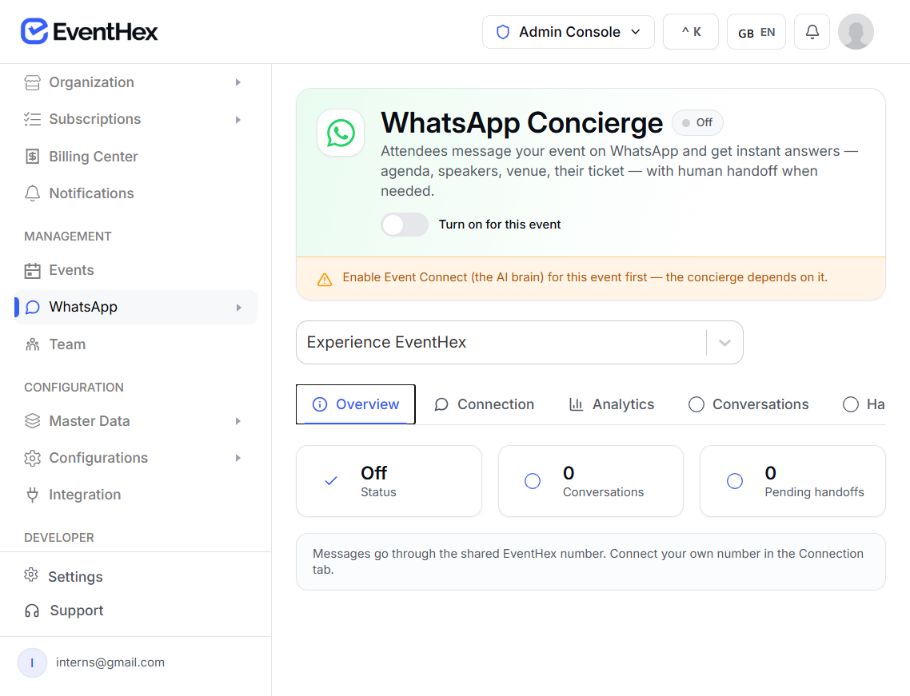
EventHex WhatsApp Concierge settings for an event, showing the per-event toggle, the Event Connect dependency notice, and concierge status, conversation and pending-handoff counts

Choose your event

Tech Summit 2026 Design Week 2026
Eligible events found Choose your event

Meta Cloud phone number

Phone number ID Required Access token Required Messages bind to the configured event
Tech Summit 2026

Where is the AI keynote?

Bound to one event Connect your number

Your WhatsApp Business number

Connect the event to an organizer-owned Meta Cloud phone number and access token. Messages for that number bind directly to the configured event.

Availability depends on the event's Event Connect and WhatsApp Concierge settings. Account verification, templates, and Meta platform requirements remain part of the WhatsApp Business setup.

Answers grounded in the event you configured

Help attendees find the event information they need now

Public event capabilities appear only when the event has the matching data or setting.

Agenda and sessions

Show the current event schedule and help attendees find relevant sessions.

Agenda
09:30 Opening keynote Hall A
10:30 The AI keynote Hall A
11:15 Platform workshop Room 3

Speakers and exhibitors

Return available speaker and exhibitor information from the event workspace.

Speakers and exhibitors

Venue and directions

Share stored venue details, a map link, or a location pin when location data is available.

Event-specific menu

Offer only the actions supported by that event instead of presenting a fixed generic bot menu.

Agenda My ticket Networking Feedback

Personal when the attendee is recognized

Move to a personal event journey

Linked to a registration, the assistant can offer personal actions.

  • My ticket or badge Send the ticket, badge, or QR on record. If configured
  • My profile Open profile fields in a WhatsApp Flow. If configured
  • My certificate Send the participation certificate when issued. If configured
  • My event photos Share the face-matched photo link. If configured
  • My recap Offer the event recap when configured. If configured

The assistant only offers what the event or registration provides.

EventHex Assistant

What can you send me?

My ticketReady My badgeReady My profileOpen form My certificateAvailable My event photos3 matches My recapAvailable
Registration and forms without a dead end

Open the right registration path from the conversation

Use a supported EventHex form as a native WhatsApp Flow, or send the public registration link when no Flow is configured and registration is open.

Book a Demo
01

Ask to register

The attendee starts from the event conversation.

EH Tech Summit Assistant Event-aware help

How do I register for the summit?

I can open the event registration form here. It takes about a minute.

Register now
Registration requested Open the form
02

Open a WhatsApp Flow

A configured registration form opens with supported text, email, phone, number, date, select, multi-select, checkbox, and consent fields.

WhatsApp Flow Step 1 of 1

Delegate registration

Full name Priya Raman Work email priya@northwind.io Attendee type Delegate Arrival date 12 Oct 2026 Consent to event updates Submit
Flow form opened Submit details
03

Use the web fallback

If no Flow is available, send the open ticket or event registration link.

EH Tech Summit Assistant Event-aware help

Can I still register?

Registration is open. Here is the event registration link.

eventhex.ai/e/eh-tech-summit Public registration page
No Flow configured Open registration link
04

Store the submission

Route completed supported forms back to the EventHex form workflow.

Form response Received
Name Priya Raman Email priya@northwind.io Ticket Delegate pass Status Registered

Routed to the EventHex registration form workflow

Submission stored View in EventHex

Supported Flow fields

Text Email Phone Number Date Select Multi-select Checkbox Consent

Personal discovery during the event

Help attendees choose sessions and people to meet

Personal recommendations use the event's enabled modules and the recognized attendee profile.

EH Tech Summit Assistant Session match

Suggest a session

The AI keynote is next in Hall A at 10:30 AM. Add it to your schedule?

Save to schedule Next session
✓ Session recommended One at a time Saved to schedule
Session recommendation

Suggest a session, one at a time

  1. Recommend a session Suggest a relevant session one at a time from the event programme.
  2. Save it Add a recommended session to the attendee's schedule when that action is available.
Networking match

Find people worth meeting

  1. Find a connection Suggest people to meet from the event networking experience.
  2. Send or skip Let the attendee act on a suggestion or move to the next match.
EH Tech Summit Assistant Networking match

Who should I meet here?

Someone else in the AI track shares three sessions with you. Send an intro?

Send intro Skip
✓ Two matches found From networking Intro sent

Participation in the same channel

Collect a live vote or the attendee's feedback

The assistant can reuse enabled EventHex poll and feedback workflows instead of creating a disconnected response store.

Live vote

Take the vote without leaving the chat

Show an active event or session poll, accept one of the available options, and return the updated result.

  • Opens an active event or session poll
  • Accepts one of the available options
  • Returns the updated result in the chat
EH Association Congress Event assistant on WhatsApp

Can I vote on the live poll?

Live poll is open Pick one option and I will show the running result. Vote on this poll

Live results

Which track are you following today?

AI and product 64% Operations 36%
Live poll open

After the session

Collect the rating in the same thread

Open a configured feedback form in WhatsApp or use the available lightweight rating path after the event starts.

  • Opens the configured feedback form in WhatsApp
  • Offers the lightweight rating path
  • Reuses the enabled feedback workflow
EH Association Congress Event assistant on WhatsApp

Can I rate the session I just attended?

Rate the session Score it out of five and it is filed with the session. Rate this session

Session feedback

How was the AI keynote?

4 of 5 recorded for this session Submit rating
Rating captured
Reminders an attendee can manage

Set, view, and cancel reminders from the chat

Recognized attendees can ask for a reminder, confirm when it should arrive, see upcoming reminders, or cancel the next one.

Book a Demo
01

Ask

Tell the assistant what to remember.

EH Tech Summit Assistant Event-aware help

Remind me before the AI keynote.

Noted. What time should I remind you?

Tomorrow, 09:45
Reminder requested Set reminder
02

Confirm time

Resolve a future date and time in the event timezone.

Reminder time Event timezone

When should we remind you?

Date 12 Oct 2026 Time 09:45 AM Timezone Asia/Kolkata (IST) Remind 45 minutes before the session Confirm time
Time resolved Confirm time
03

Receive

Send the reminder through the available WhatsApp window or configured template path.

Reminder sent WhatsApp
Reminder The AI keynote Path Approved template Window Open session Status Delivered

A scheduled reminder is delivered through the available WhatsApp window or the configured template path, in the event timezone.

Reminder scheduled Send now
04

Manage

List or cancel upcoming reminders in the conversation.

Upcoming reminders 2 scheduled
Tomorrow, 09:45 The AI keynote Hall A, 10:30 AM Cancel reminder
Fri, 14:30 Closing keynote Main stage, 3:15 PM
Reminder listed Cancel reminder
A human path when the assistant should stop

Move the conversation to the event team without losing context

Step 01

Attendee requests help

Recognize requests to talk to an organizer, agent, staff member, or human.

An attendee can ask for a person. EventHex keeps the conversation in handoff until an organizer resolves it or the attendee returns to the menu.

Book a Demo
EH Tech Summit Assistant Event-aware help

Can I speak to a person?

Connecting you with the event team now.

Talk to the event team
Step 02

Conversation enters handoff

Keep later attendee messages attached to the same conversation while the event team owns the response.

Book a Demo
Handoff inbox 2 waiting
Priya N. Can someone check my badge name? Handoff Marco D. Voice note, 0:12 Handoff
Step 03

Organizer opens the transcript

Review the attendee, current state, and recorded conversation turns.

Book a Demo
Conversation transcript Priya N.

Can someone check my badge name?

Connecting you with the event team now.

Voice note, 0:08

Step 04

Mark it resolved

Return the conversation to the active assistant state when the organizer finishes.

Book a Demo
Handoff inbox Resolved

Thanks, that is sorted.

Happy to help. Ask me anything else about the event.

Mark resolved

Organizer visibility behind the chat

See what attendees are asking and where help is waiting

Move from an overview count to the conversation or topic behind it.

Conversation overview Tech Summit 2026
248Conversations 18Open 24h windows 2In handoff
Waiting for a teammate to pick up
✓ Concierge live Event Connect on 2 in handoff
Live overview

Conversation overview

Review total conversations, currently open 24-hour windows, message count, and conversations in handoff.

Top topics

Top topics

See recurring terms across recent attendee questions for the selected event.

Top topics Last 7 days
keynote hall agenda badge pickup parking lunch
  • keynote hall64
  • agenda48
  • badge pickup27
  • parking19
✓ Grouped by topic Recent questions keynote hall leads
Recent questions Last 24 hours
  • Where is Hall A? Answered
  • Is lunch included today? Answered
  • Can I change my badge name? Handoff
✓ Answered in chat Most questions 1 moved to handoff
Recent questions

Recent questions

Inspect recent prompts and the type of response the assistant returned.

Transcripts

Conversation transcripts

Open a conversation to review recorded attendee questions, assistant replies, voice-note indicators, and handoff state.

Conversation transcript Handoff

Can I talk to someone about my badge?

I have asked the event team to join this chat. They can see this conversation.

Voice note, 0:14 Transcript kept
✓ Full context kept Questions and replies Resolved by organizer

For programmes with many attendee questions

Give each audience a faster route to the right event detail

Configure the assistant around the content and attendee actions each event actually provides.

Exhibitions and trade shows

Help visitors find sessions, exhibitors, venues, tickets, and available networking actions.

Replaces
  • Sessions, exhibitors, and venue lookups
  • Ticket and registration answers
  • Available networking actions
EH Global Expo 2026 Event assistant on WhatsApp

Where is Hall 3 and stand B12?

Hall 3 - North Wing Stand B12 is beside the Innovation Stage. Open venue map

Answered from

Sessions 42 listed Exhibitors 186 stands Venues 6 halls Tickets 3 types
Venue and stand answered

Conferences and associations

Answer programme questions, surface speakers, recommend sessions, and collect available polls or feedback.

Replaces
  • Programme questions answered
  • Speaker and session recommendations
  • Available polls and feedback
EH Association Congress Event assistant on WhatsApp

Which sessions cover programme analytics?

3 matching sessions Thu 11:00 - Hall 2 - Panel with the research track. Add to my agenda

Matched from

Programme 3 sessions Speakers 4 listed Track Research Poll Feedback form
Sessions recommended

Corporate and technology events

Guide invited attendees to their event information, schedule, badge, reminders, and event-team help.

Replaces
  • Invitee event information
  • Schedule, badge, and reminders
  • Event-team help on request
EH Tech Summit 2026 Event assistant on WhatsApp

What is my badge and schedule for tomorrow?

Badge ready - VIP 09:30 Opening - Hall 1, 11:00 Workshop B. Send reminder

Invitee details

Event details Confirmed Schedule 2 sessions Badge VIP pass Reminders Turned on
Badge and schedule sent

Event agencies

Enable and review the concierge per event while keeping each event's number, conversations, handoffs, and topics visible.

Replaces
  • Concierge enabled per event
  • Numbers, topics, and conversations kept per event
  • Handoffs reviewed in one queue
EH Agency workspace Event assistant on WhatsApp

Which events need attention today?

2 events need a reply Tech Summit 2026 - 2 handoffs, Design Week - 1 handoff. Open handoff queue

Per event

Numbers 2 connected Conversations 38 today Handoffs 3 pending Topics 5 tracked
Per-event workspace

Continue to the feature that owns the next job

Conversation, campaigns, alerts, and registration have different owners

Use WhatsApp Concierge for attendee questions and interactive actions. Continue to the dedicated workflow when the job changes.

Event Marketing

Build planned email or WhatsApp campaigns for a selected event audience.

Learn more

Event Notifications

Configure operational and trigger-based attendee alerts across supported channels.

Learn more

WhatsApp Integration

Understand the WhatsApp Business connection, templates, and messaging infrastructure.

Learn more

Event Registration

Design the complete web registration, form, and ticket-selection journey.

Learn more
Quick answers

WhatsApp Event Assistant
Questions, Answered.

Find quick answers about setup, attendee capabilities, registration, reminders, handoff, and organizer visibility.

Book a Demo
What is EventHex WhatsApp Event Concierge?

It is an event-aware attendee assistant inside WhatsApp. It can answer questions and open available attendee actions using the selected event's data and settings, while organizers manage status, conversations, handoffs, and insights in EventHex.

What can attendees ask about?

Depending on the event configuration, attendees can ask about the agenda, sessions, speakers, exhibitors, venue, registration, polls, and available event help. Recognized attendees can also access personal capabilities such as a ticket, schedule, networking, reminders, profile, certificate, matched photos, or recap when those items are available.

Does every event show the same options?

No. The capability menu changes with the event's settings and content. Personal options also depend on whether the WhatsApp number can be matched to an event registration.

Can attendees register inside WhatsApp?

A configured EventHex registration form can open as a native WhatsApp Flow when its fields are supported. If no Flow is available, the assistant can send the public registration link while registration is open.

Can attendees pay inside the WhatsApp chat?

The WhatsApp Concierge workflow does not include native payment collection. Paid registration should continue through the EventHex checkout or ticketing path shown from the registration link.

Can we use our own WhatsApp Business number?

Yes. An event can use a connected Meta Cloud phone number and access token. EventHex also provides a shared-number path for eligible events. The setup still depends on WhatsApp Business platform requirements.

How does human handoff work?

An attendee can ask to speak with a person. The conversation enters the organizer handoff inbox, keeps its transcript and later attendee context, and returns to the assistant after an organizer marks it resolved.

What can organizers see?

Organizers can see concierge status, conversation and handoff counts, open 24-hour windows, message counts, top topics, recent questions, conversation transcripts, and pending human handoffs for the selected event.

Is WhatsApp Concierge the same as a WhatsApp campaign?

No. Concierge handles attendee questions and interactive actions. Event Marketing owns planned broadcast campaigns, Event Notifications owns operational alerts, and WhatsApp Integration owns connection and template infrastructure.

Related EventHex features

  • Event marketing for email and WhatsApp →

    Targeted campaigns built from the registration data you already have.

  • Online event registration software →

    Run a single form or a full checkout, confirmed by email and WhatsApp.

  • AI event copilot →

    Ask about attendees, tickets, and sessions, and prepare supported actions.

WhatsApp Event Assistant

See how your event becomes a useful WhatsApp conversation

Bring one real attendee journey and map it from the first message to the organizer view.

Book a Demo
EventHex platform on laptop, tablet, and mobile
HomeAbout UsPartner With UsGet Demo
Get DemoBlogContactRefunds
CancellationPrivacy PolicyTerms & ConditionsCookie Policy

EventHex© 2026 All rights reserved

1
Hamim Akif Book a demo with Hamim Akif See EventHex live in 30 minutes
Cookie Consent

We use cookies to enhance your experience. Read our cookie policy.