Short answer: An event management MCP server is a secure connection layer that lets an AI assistant work with approved event data and tools. Instead of giving organizers generic advice, the assistant can use current information from an event platform and—when permissions allow—complete tasks such as creating ticket tiers, updating an agenda, checking registrations, reviewing revenue, or publishing an event website.
The important word is approved. MCP does not automatically give an AI system unrestricted access to an event account. A well-designed connection exposes a defined set of tools, respects the organizer’s existing permissions, and makes consequential actions visible or subject to confirmation.
This practical guide explains what an event management MCP server is, how it works, what organizers can realistically do with one, and what to check before connecting an AI assistant to live event operations.
What is an event management MCP server?
MCP stands for Model Context Protocol. It is an open protocol for connecting AI applications to external data and capabilities in a consistent way. The official MCP architecture separates the AI host, the client connection, and the server that exposes specialized capabilities.
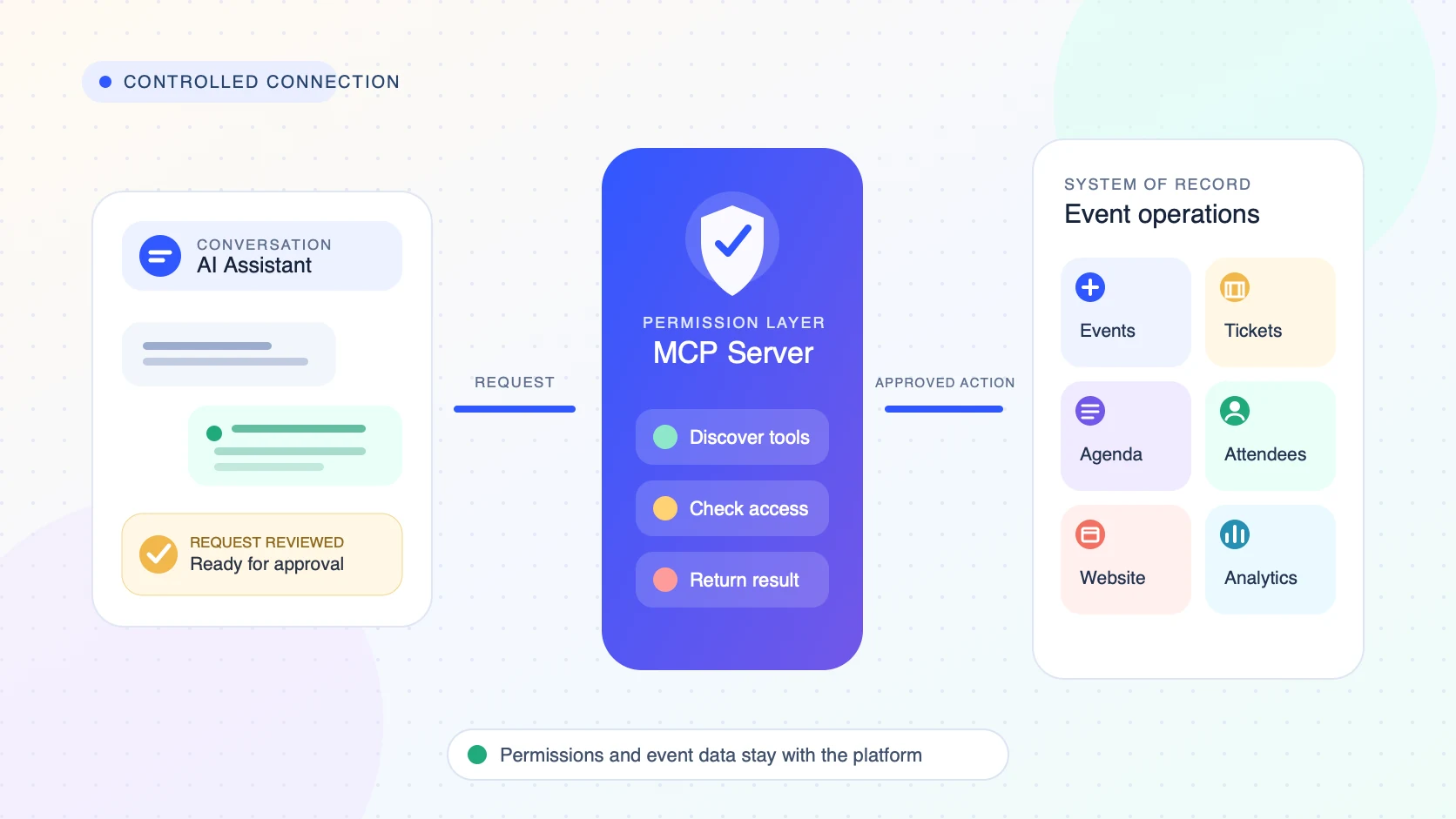
In event management, the MCP server sits between an AI assistant and the event platform. It translates approved requests into structured operations that the platform understands.
For example, an organizer might ask:
- “Create three ticket tiers for our annual conference.”
- “Show registrations and paid revenue for this event.”
- “Add these speakers and build Friday’s agenda.”
- “Which sessions are close to capacity?”
- “Draft an event website and prepare it for review.”
Without a connector, an AI assistant can explain how to perform those tasks. With an action-capable event management MCP server, it can discover the relevant tools, request the required details, and use the event platform to perform the approved work.
How does an MCP server work for an event organizer?
You do not need to understand the protocol internals to evaluate the workflow. A practical event-management connection has four parts:
- The host: the AI application where the conversation happens, such as ChatGPT or another MCP-compatible assistant.
- The client connection: the component that maintains the connection, discovers capabilities, and carries requests between the assistant and the server.
- The event management MCP server: the service that publishes approved event tools and data.
- The event platform: the system of record for events, tickets, attendees, agenda, websites, payments, and analytics.
When you make a request, the assistant interprets your goal, selects an available tool, supplies structured inputs, and returns the platform’s result in the conversation. The platform—not the language model—remains the source of truth.
A typical workflow looks like this:
- You ask the assistant to perform or investigate an event task.
- The assistant checks which event tools are available.
- It identifies the correct event and requests any missing information.
- For a sensitive or high-impact action, the interface asks for confirmation.
- The MCP tool calls the event platform using the connected user’s permissions.
- The assistant reports the result, including useful identifiers, counts, or the real published URL.
Tools, resources, and prompts: the three MCP building blocks
The MCP specification describes three core server primitives: tools, resources, and prompts. For organizers, they translate into three different kinds of value.
Tools perform or retrieve event operations
Tools are structured functions that an AI model can discover and invoke. An event platform might expose tools for creating an event, listing ticket types, adding a speaker, searching attendees, retrieving event statistics, or publishing a website.
The official MCP guidance recommends keeping a human in the loop and making tool use visible, particularly when a tool can change data. That matters when the action affects prices, attendees, communications, public pages, or event availability.
Resources provide controlled event context
Resources give the assistant information it can use as context. In an event workflow, that could include an event brief, venue information, agenda data, brand guidelines, registration rules, or a current event configuration.
Prompts standardize repeatable workflows
Prompts can package reusable instructions. A team could use a standard daily event-health check, speaker onboarding workflow, pre-event readiness review, or post-event reporting template without rewriting the process each time.
How is an MCP server different from an API, chatbot, or automation?
These technologies can work together, but they are not interchangeable.
| Technology | Primary role | Typical organizer experience | Main limitation |
|---|---|---|---|
| Built-in chatbot | Answers questions inside one product | Use a chat panel within the event platform | May be limited to that product’s interface and predefined use cases |
| API | Lets software communicate through documented endpoints | A developer builds a custom integration | Requires implementation and orchestration |
| Workflow automation | Runs predefined trigger-and-action sequences | Configure “when this happens, do that” rules | Less flexible when the request changes or needs reasoning |
| MCP server | Publishes discoverable tools and context to compatible AI clients | Ask for the outcome conversationally and review the proposed action | Quality depends on tool coverage, permissions, approvals, and implementation |
An API is often part of the underlying implementation. MCP adds a standardized way for an AI client to discover and call capabilities, while the host application manages the conversation, consent, and orchestration.
What can event organizers do with an MCP connection?
The answer depends on the tools published by the platform. “Supports MCP” does not automatically mean every platform feature is available to the assistant.
1. Create and configure events
An action-capable connector can turn a brief into structured event details: title, dates, timezone, venue, format, description, and other setup fields. This reduces repetitive form filling while keeping the event record inside the management platform.
2. Build registration and ticketing
Organizers may be able to create free or paid ticket tiers, configure capacity, set pricing, add early-bird rules, and review registration performance. The safest implementation clearly separates a draft suggestion from a live price or capacity change.
See how EventHex handles event registration and event ticketing.
3. Manage speakers and agenda
Instead of entering every item separately, a team can provide a speaker list or session plan and ask the assistant to structure it. Useful tools can create speakers, assign roles, add sessions and breaks, update timing, and retrieve the current agenda for review.
Related EventHex capabilities include speaker management and session management.
4. Retrieve attendee and event analytics
A read-only connection can still be valuable. Organizers can ask for registrations, paid attendees, check-ins, ticket performance, revenue, or comparisons across events without exporting and rebuilding a spreadsheet.
Analytics answers should always identify the event, date range, and metric definition. “165 registrations” is less useful than “165 paid attendee registrations for the Annual Summit as of 10:00 AM.”
5. Build and publish an event website
A more complete connector can carry the same event context into website creation. The assistant can help generate the structure and content, prepare a private draft, apply design instructions, and publish only after review.
Explore the EventHex event website builder.
6. Run repeatable operational checks
Teams can turn recurring procedures into conversational workflows: identify missing speaker details, find sessions without rooms, review low-selling ticket tiers, compare registration pace, or prepare a daily executive summary.
Read-only versus action-capable MCP servers
This is the most important distinction for buyers.
A read-only MCP server can retrieve or analyze information but cannot change the event. It may be the right choice for reporting, event discovery, configuration inspection, or early pilots.
An action-capable MCP server can create, update, publish, register, message, or delete data—depending on the available tools and user permissions. It can remove more operational work, but it also requires stronger governance.
Ask vendors for a current tool inventory. Do not rely on a general statement that the product “works with AI.” Confirm:
- Which tools are read-only?
- Which tools change event data?
- Which actions require confirmation?
- Which tools are generally available, beta, or plan-dependent?
- Do the tools inherit the user’s existing role and event access?
For a wider market view, read our comparison of event tech platforms that work with ChatGPT and AI assistants.
Is an event management MCP server secure?
MCP is a protocol, not an automatic security guarantee. Security depends on the host, server, event platform, authentication flow, tool design, and operational policies.
Before connecting live event data, evaluate these controls:
- Authentication: How does the connection verify the user and establish access?
- Authorization: Does it enforce the roles and event permissions already configured in the platform?
- Least privilege: Can the connection limit tools and data to what the workflow actually needs?
- Human approval: Are destructive, public, financial, bulk-data, or communication actions clearly confirmed?
- Personal-data handling: How are attendee names, contact details, accessibility information, dietary needs, and payment status protected?
- Auditability: Can administrators see which user or assistant performed an action?
- Revocation: Can access be removed quickly without changing the entire account?
- Data retention: Which systems receive event data, and how long do they retain it?
OpenAI’s data-control documentation notes that remote MCP servers are third-party services and that data sent to them is subject to the server provider’s own retention and residency policies. Organizers should therefore review both the AI host’s terms and the event platform connector’s policies.
A practical MCP evaluation checklist for event teams
Use a real pilot rather than a polished demo alone.
- Start with one event: choose a non-critical event or a controlled test environment.
- Test three roles: administrator, event manager, and limited-access teammate.
- Run both read and write scenarios: retrieve statistics, then perform a reversible update.
- Check event selection: the assistant should resolve the correct event instead of guessing.
- Inspect confirmations: test pricing, publishing, attendee export, deletion, and messaging boundaries.
- Verify returned results: confirm the change in the event platform and open any real URL the tool returns.
- Review failure behavior: see what happens with missing fields, invalid dates, insufficient permissions, and duplicate records.
- Document repeatable prompts: convert successful workflows into team operating procedures.
How EventHex uses MCP for practical event operations
EventHex has a published ChatGPT app that connects conversational requests to event-management tools. Depending on the connected account’s permissions and available tools, organizers can work across event setup, tickets, speakers, sessions, attendees, registrations, analytics, and event website workflows.
The workflow is designed to preserve clear boundaries. Event-scoped actions use real event identifiers rather than guessed names. Website changes can remain private drafts until publication. Sensitive operations such as attendee export or deletion can use explicit approval steps. Analytics responses retain the event and metric scope so a number is not separated from its meaning.
The practical benefit is not “AI replaces the event team.” It is that the team can use one conversational layer to coordinate approved tasks across the event lifecycle while EventHex remains the operational system of record.
Frequently asked questions
What does MCP stand for in event management?
MCP stands for Model Context Protocol. In event management, it provides a standardized connection between an AI application and approved event-platform data or tools.
Do event organizers need coding skills to use an MCP server?
Usually not. The platform provider or technical team builds and maintains the MCP server. Organizers interact through an AI client, although an administrator may still need to authorize the connection and configure permissions.
Can ChatGPT create and manage a real event through MCP?
Yes, if the connected event platform exposes action-capable tools and the user has permission. The exact scope varies by platform. Some connectors are read-only, while others can create events, configure tickets, manage agenda items, or publish websites.
Is an MCP server the same as an event management API?
No. An API exposes endpoints for software integrations. An MCP server can use those APIs behind the scenes, but it packages capabilities in a standard form that compatible AI clients can discover and call.
What should an organizer test first?
Start with a read-only question about one test event, then perform a small reversible update. Confirm that the assistant selects the correct event, respects the user’s permissions, reports the result clearly, and asks for approval before a high-impact action.
The takeaway
An event management MCP server turns an AI assistant from a general adviser into a controlled interface for real event work. The strongest implementations combine useful tool coverage with clear permissions, scoped data access, human confirmation, and verifiable results.
For organizers, the buying question is no longer simply “does this platform have AI?” It is: which event tasks can our assistant safely understand, retrieve, and complete?
If you want to see how conversational event operations can work across setup, ticketing, agenda, analytics, and event websites, book an EventHex demo.