In the high-stakes world of event planning, success has traditionally been measured by registration numbers, active participation, and immediate post-event survey scores. However, in the modern experience economy, the true value of an event is realized long after the virtual doors close or the physical venues are packed away. The real challenge that event organizers, marketers, and corporate leaders face is maintaining momentum and securing long-term post-event engagement.
Once an event concludes, attendee enthusiasm naturally decays. Without a structured post-event touchpoint, organizers miss a crucial window to solidify relationships, cultivate brand loyalty, and spark organic viral marketing. This is precisely where an automatic certificate generator steps in, transforming a routine administrative task into an extremely powerful engine for post-event satisfaction, continuous brand advocacy, and professional verification.
By automating the creation and distribution of high-quality digital credentials, organizations can reward participation in real-time, incentivize attendance for future sessions, and drive continuous social media shares. Leveraging cutting-edge systems like EventHex.ai, planners can streamline this entire workflow—from registration to recognition—ensuring every attendee walks away with a verified token of achievement that they are proud to share with their professional networks.
The Post-Event Engagement Crisis: Why Traditional Follow-Ups Fail
For years, the standard post-event engagement playbook consisted of a generic “thank you for attending” email, accompanied by a link to a feedback survey and a PDF slide deck. In 2026, this approach is no longer sufficient. Attendees are flooded with digital noise, and their attention spans are shorter than ever. Generic follow-up emails suffer from abysmal open rates, and surveys are often ignored unless heavily incentivized.
The core issue is a lack of mutual value exchange. A survey or slide deck benefits the organizer far more than the attendee. To unlock genuine, proactive engagement, organizers must offer immediate, personalized value. Professional credentials, completion certificates, and skills badges provide this exact value by directly enhancing the attendee’s professional profile, proving their dedication, and signaling expertise to peers and employers.
What is an Automatic Certificate Generator?
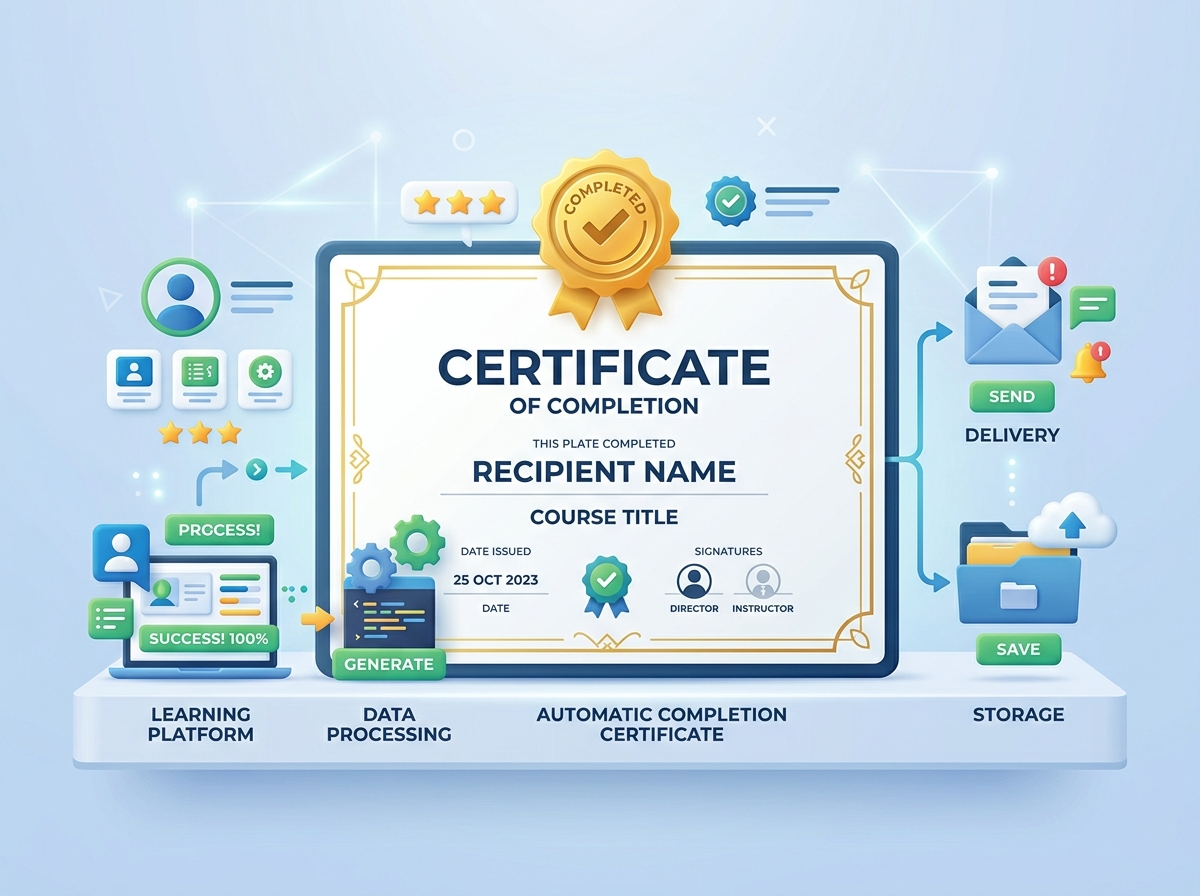
An automatic certificate generator is a software-driven solution that automatically designs, personalizes, and distributes professional certificates or digital credentials to a list of recipients based on predefined triggers or database inputs. Rather than having designers manually update names, titles, and dates on individual image templates, an automated system leverages dynamic placeholders to generate thousands of unique, beautifully-designed certificates in minutes.
When integrated directly into an event ecosystem, the certificate generator triggers immediately upon specific milestones, such as completing a seminar, passing a brief quiz, or checking out of a multi-day conference. This ensures seamless delivery and a polished, professional experience for every participant.
How Automatic Certification Drives Post-Event Engagement
The introduction of automated, personalized credentials alters the psychology of event participation. It shifts the attendee’s mindset from passive consumption to active achievement. Here are the primary mechanisms through which an automatic certificate generator drives post-event engagement:
1. Instant Gratification and Real-Time Appreciation
The moment an event ends, the attendee’s emotional connection to the content is at its peak. Waiting days or weeks for a certificate to be manually emailed completely destroys this momentum. An automated system ensures that as soon as check-out or evaluation is complete, the certificate lands in the user’s inbox or digital wallet. This instantaneous delivery rewards their time investment, reinforcing a positive association with your brand.
2. Maximizing Social Proof and Virality
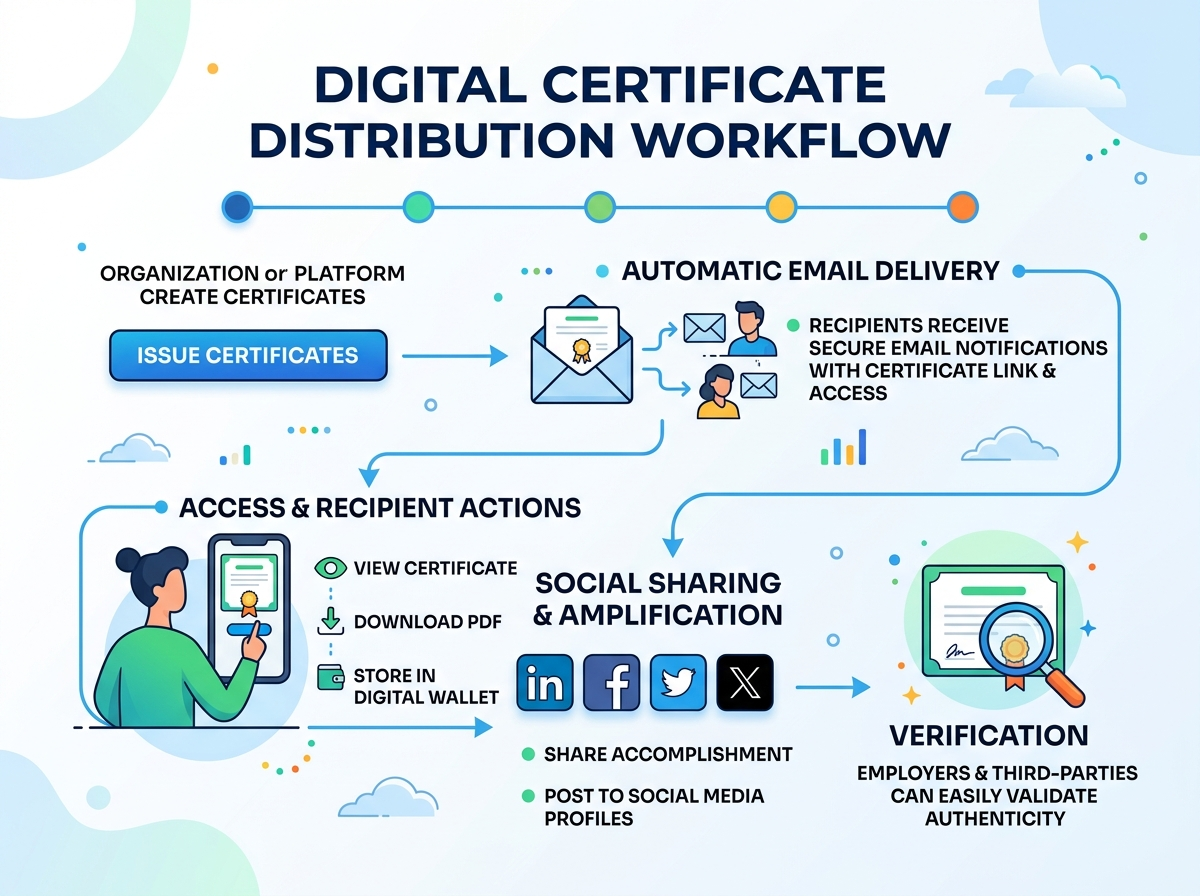
Professionals love to share their achievements. A beautifully crafted certificate, easily shareable on LinkedIn, Twitter, or Facebook, turns your attendees into active brand ambassadors. When an attendee posts their certificate online, they are not just celebrating their own growth; they are exposing your brand, logo, and event name to their entire professional network. This organic social proof is far more trustworthy and cost-effective than paid advertising.
3. Seamless Integration with Registration Workflows
An optimized credentialing strategy begins long before the certificates are issued. It starts at registration. By syncing your certificate engine with tools like EventHex Event Registration, you ensure that attendee details are captured accurately from day one, eliminating typos in names or email delivery errors. This interconnected flow lays the foundation for a flawless post-event experience.
The Manual vs. Automated Certification Workflow
To fully appreciate the business value of automation, it is helpful to compare the traditional manual certificate generation process against an automated, modern workflow:
| Workflow Stage | Traditional Manual Process | Automated Certification Workflow |
|---|---|---|
| Design & Creation | Designer manually edits PSD/AI templates for each individual attendee. High risk of typos. | Dynamic attributes (e.g., {recipient.name}, {event.date}) automatically map data onto a single master template. |
| Data Handling | Copy-pasting names from spreadsheets. Highly tedious, slow, and prone to human error. | Data is securely pulled via direct API integrations or bulk CSV uploads, ensuring 100% accuracy. |
| Distribution | Sending individual emails with attachments manually or setting up complex, error-prone mail merges. | One-click or fully triggered email delivery with embedded PDF downloads and digital sharing links. |
| Tracking & Verification | No clear record of who received or shared their credentials. Difficult to verify authenticity. | Centralized monitoring of delivery, opens, bounces, and social shares, backed by unique verification links or QR codes. |
Key Features to Look for in a Certificate Generator
Not all automatic certificate generators are created equal. To successfully drive post-event engagement and deliver a premium experience, your chosen solution should feature:
- Dynamic Attributes and Personalization: The ability to insert personalized fields, custom scores, grade points, or unique achievement levels onto each design.
- Brand Consistency: Support for custom backgrounds, company logos, branded colors, and distinct typography to ensure the certificate looks like an authentic extension of your organization.
- Social Sharing Integration: One-click “Add to LinkedIn Profile” buttons or built-in sharing widgets that make it incredibly easy for recipients to showcase their achievements.
- Secure Verification (QR Codes): Unique, verifiable links or QR codes embedded on the certificate, allowing employers or peers to verify its authenticity instantly on your website.
- Centralized Analytics: A dedicated platform, such as the EventHex Centralized Dashboard, to track overall certificate delivery status, open rates, and social media reach in one view.
Step-by-Step Implementation Guide for Event Organizers
Setting up an automated certificate system for your next event is a highly rewarding process. Follow these core steps to ensure a flawless execution:
Step 1: Define Your Credential and Rules
Determine what achievement warrants a certificate. Is it simple attendance, active completion of all sessions, or passing a comprehensive assessment? Setting clear, achievable criteria elevates the perceived value of the credential.
Step 2: Create a Stunning Template
Design a visually striking template that reflects your event’s theme and corporate branding. Keep the layout clean, leave ample room for long names, and use high-contrast fonts. Remember to position your placeholders for the recipient’s name, certificate title, date, and unique ID carefully.
Step 3: Map Your Data and Dynamic Attributes
Sync your registration database with the certificate engine. Map the appropriate fields (such as ‘First Name’, ‘Last Name’, and ‘Email’) to the dynamic attributes on your certificate template. Ensure proper testing is done with sample records to catch alignment or formatting issues.
Step 4: Configure the Email and Delivery Flow
Draft a compelling, highly personalized email template that will deliver the certificate. Craft a subject line that generates excitement (e.g., “Your Official {Event Name} Certificate is Ready!”) and include a direct, prominent button calling them to download and share their credential on social media.
Step 5: Run a Pilot Test
Always run a test batch with internal email addresses before launching. Verify that the dynamic text fits perfectly, the PDF attachments open smoothly, the QR verification works correctly, and the email layout is responsive across both mobile devices and desktop clients.
Step 6: Launch and Monitor Social Engagement
Once live, sit back and watch the certificates fly out automatically. Use your central reporting dashboard to monitor delivery rates, open rates, and social media mentions. Engage with attendees who post their certificates online to amplify your event’s reach even further!
Conclusion: Turn Achievements into Lifetime Brand Value
In 2026 and beyond, successful events are those that build community and sustain interest long after the final session concludes. An automatic certificate generator is not merely a tool for saving administrative time; it is a vital engagement and marketing mechanism that bridges the gap between active event participation and long-term brand loyalty.
By providing immediate, tangible value in the form of secure, shareable, and professionally-enriching digital credentials, you empower your attendees to become passionate advocates for your brand. Integrating these automated certificate workflows into a comprehensive event suite like EventHex.ai ensures that every stage of your event is optimized for growth, satisfaction, and maximum post-event impact.
Frequently Asked Questions (FAQ)
How does an automatic certificate generator save time for large events?
Instead of manually editing and emailing thousands of certificates, an automatic generator uses dynamic attributes and direct integrations to personalize and distribute all credentials instantly in a single click, reducing hours of tedious manual design work to seconds.
Can attendees share their certificates directly to LinkedIn?
Yes. Leading certificate generators provide built-in “Share to LinkedIn” and “Add to Profile” features, allowing attendees to seamlessly showcase their achievements, which dynamically promotes your event to their entire professional network.
What are dynamic attributes in certificate templates?
Dynamic attributes are placeholders (like {recipient.name}) that tell the generator to pull actual data from your database or registration form, ensuring every generated certificate is fully personalized for the individual recipient.
Is it possible to verify the authenticity of an automatically generated certificate?
Absolutely. Most advanced automated certificate systems embed unique verification links or scannable QR codes onto the designs. When scanned, these code links redirect employers or peers to a secure hosted page confirming the credential’s validity.
Can I customize the design to match my brand identity?
Yes, professional systems allow you to fully customize backgrounds, upload custom fonts, add company logos, select custom sizes, and arrange elements freely to ensure the certificate perfectly matches your corporate styling and brand guidelines.