
Short answer: Virtual attendees stay when they have something to do, not just something to watch. Open with a live poll, spotlight real attendee questions, schedule networking as a programme item, run challenges with a visible leaderboard, deliver a session recap within hours, and ask for feedback every session. Each idea below names the attendee action, the organizer check, and where EventHex fits.
A virtual audience can leave without standing up. There is no closing door, no corridor chat pulling them back, no speaker presence holding the room. Attention is the scarce resource, and the programme has to earn it in the first five minutes and re-earn it every fifteen after that.
This guide covers eight engagement ideas for corporate conferences, association programmes, and online learning sessions. EventHex is the publisher and one of the product examples. Some workflows below use event-platform features; others are organizer practices that work on any stack. They are not all automatic features of one product.
Engagement ideas at a glance
| Idea | What the attendee does | Organizer check |
|---|---|---|
| 1. Open with a live poll | Votes in one tap from phone or laptop | Question ready, QR and link tested, results view confirmed |
| 2. Spotlight real questions | Asks anonymously, sees one question answered live | Moderator assigned, spotlight display rehearsed |
| 3. Schedule networking | Discovers people, requests, connects, chats, meets | Directory access by ticket type verified before doors open |
| 4. Run challenges and a leaderboard | Completes actions, earns points, checks position | Supported action triggers only; reward terms written by you |
| 5. Put the programme in their pocket | Follows agenda, joins sessions, gets reminders | Event app tested on attendee devices, not only yours |
| 6. Deliver a recap within hours | Revisits overview and takeaways the same day | Source content usable; reviewer assigned before publishing |
| 7. Ask for feedback every session | Rates or reacts in seconds | One short form per session; results reviewed, not filed |
| 8. Rehearse the interaction path | Everything above works on the first attempt | Full attendee-path rehearsal completed before go-live |
1. Open with a live poll, not housekeeping slides
The first interaction should happen before the first slide. A single opening question — experience level, biggest challenge, prediction about the topic — converts passive viewers into participants and gives the speaker a live read of the room.
Keep it to one question with three or four answer options. Long or frequent polls fatigue the audience faster than no polls at all. Show the result, react to it, and reference it later in the session so voters see their input mattered.
EventHex live polling supports polls with several answer options (one vote per attendee), registered or anonymous voting, QR and link access, vote totals and percentages, and active, ended, and reopened states. Decide anonymity before the session: named voting suits CPD and compliance contexts, anonymous voting suits honest opinions. Confirm which path your event uses and test the QR and link as an attendee, not only as an administrator.
2. Give attendee questions a visible moment
Questions submitted into a void discourage further questions. When one attendee question is displayed and answered live, submissions rise for the rest of the programme because the audience learns that asking works.
Assign a moderator whose only job is the question queue: grouping duplicates, filtering off-topic items, and choosing the single question to spotlight. Tell the audience the rule up front — for example, top-voted or most representative question answered live, the rest answered in the recap.
EventHex lets attendees ask questions from a QR code or link without signing in, and the moderator can spotlight one question at a time on the display. Asking without a name matters for virtual audiences who will not attach their name to a difficult question in front of colleagues. Rehearse the moderator flow end to end: submit, select, spotlight, and clear.
3. Schedule networking instead of hoping for it
Virtual attendees do not bump into each other. If networking has no slot, no directory, and no suggested next step, it does not happen. Put connection time in the agenda with the same status as a keynote, and give people a structured way to find each other.
A workable loop is: discover relevant profiles, review before requesting, accept or decline, continue in chat, and schedule a one-to-one meeting. Each step needs explicit organizer setup — who can see whom, which ticket types get access, and what happens after a connection is accepted.
EventHex Smart-Connect provides AI-assisted people search and similar-profile suggestions inside the event app, a networking directory with All, Connections, Invitations, and Requests states, attendee profile review before sending a request, accept, decline, withdraw, disconnect, and bookmark handling, chat after a connection is accepted, and one-to-one meeting scheduling after connection. Organizers control ticket-type access, speaker and booth-member visibility, profile-card fields, and sorting. Availability depends on the event’s enabled modules and configuration, so verify the directory as each ticket type before doors open.
4. Run challenges with a leaderboard people actually check
Points work when they reward behaviour the organizer wants: attending sessions, submitting questions, visiting exhibitor pages, completing feedback. They fail when the actions are unclear, the leaderboard is buried, or the reward is vague.
Publish three things before the event: which actions earn points, where the leaderboard lives, and what the reward is with its exact terms. Keep challenges to single or clearly recurring actions with stated counts and schedules. Reward fulfilment, eligibility, and any tax or legal terms remain the organizer’s responsibility — write them down before promising anything on stage.
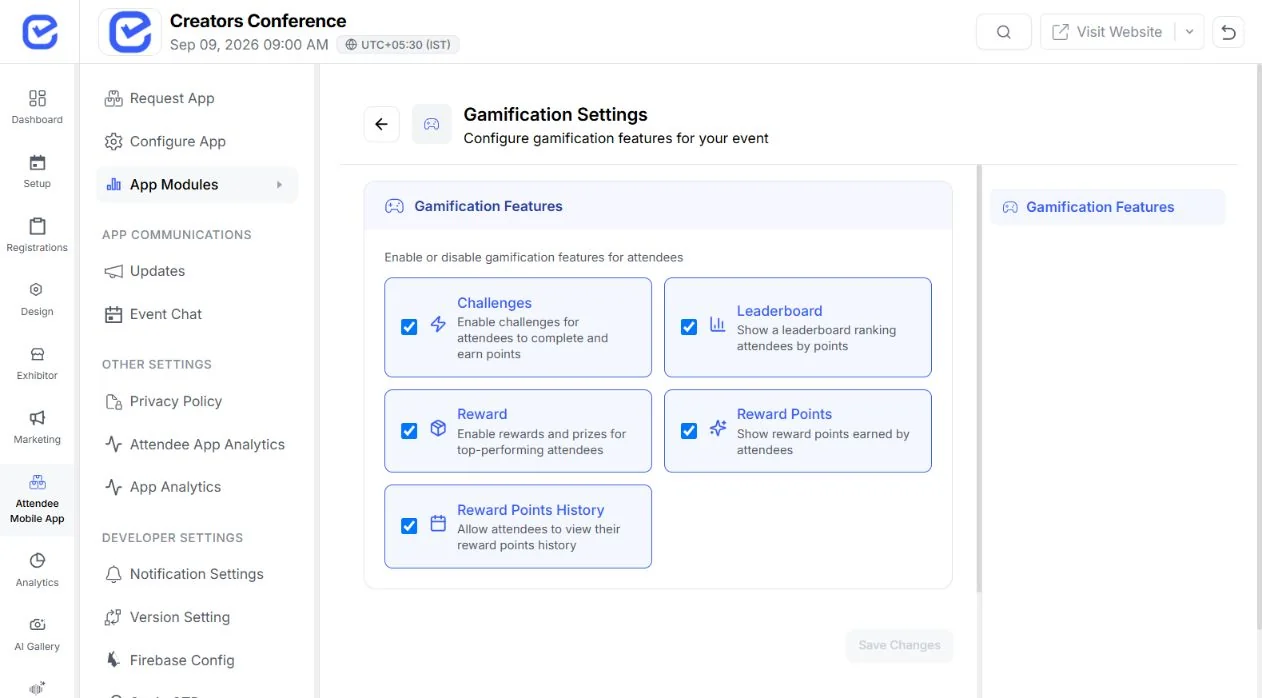
EventHex gamification supports attendee-action challenges with rule controls, points, progress and point history, leaderboards, manual adjustments, position and milestone rewards, and points-threshold draws. Use only supported action triggers for each challenge; a custom title does not create a new completion mechanism. Do not treat illustrative point values in planning artwork as results. For more challenge formats, see our event gamification strategies guide.
5. Put the programme in the attendee’s pocket
Virtual attendees juggle tabs, messages, and calendars. An event app that carries the agenda, joining links, and reminders removes the most common reasons people drift away: not knowing what is on, where to join, or what they missed.
Send scheduled reminders before each session the attendee selected, not one generic blast in the morning. After a session ends, the next interaction — recap, feedback, or upcoming recommendation — should already be visible without searching.
The EventHex event app carries the programme, session access, networking, polling, and recap paths in one attendee experience. Test it on the devices and network conditions your audience actually uses. A workflow verified on an organizer’s laptop and office wifi is not verified.
6. Deliver a session recap within hours, not weeks
Engagement does not end at logout. An attendee who receives a clear overview and structured takeaways the same day is more likely to return tomorrow, share the session, and answer your feedback form. A recording alone rarely does this work — finding one useful point can take longer than the attendee has.
Build each recap around the actual session title, speaker context, and source content. Distinguish what the speaker explained, what they recommended, and what remained unresolved. Never present a tentative observation as a proven result, and keep access to the source material so a reviewer can check context.
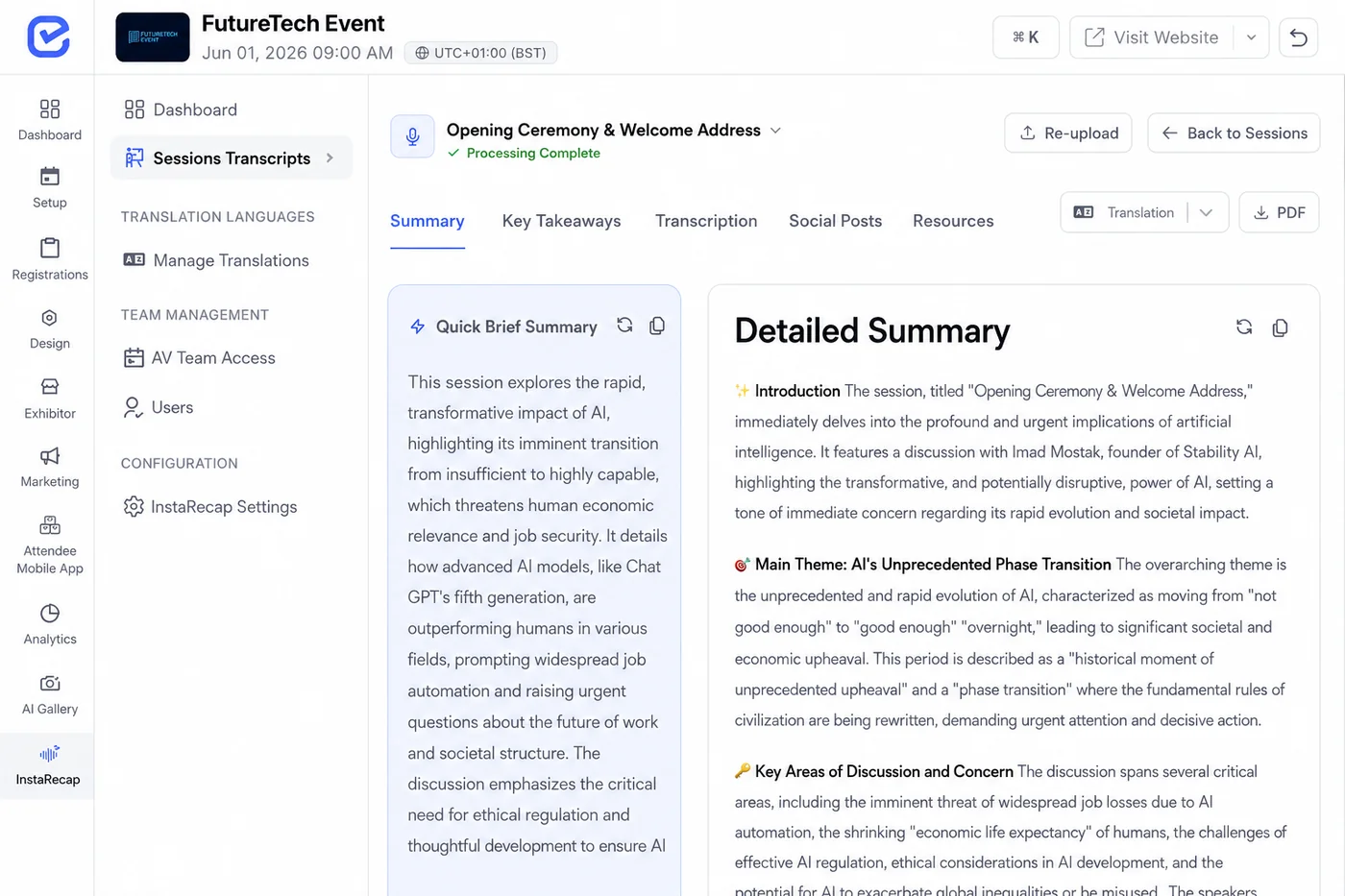
EventHex InstaRecap provides session overview and takeaway workflows, and the virtual and hybrid event workflow can retrieve recap outputs for its associated session. Output depends on usable source content and successful processing. Assign a reviewer before the event and keep a human review step between generated content and attendee distribution. Our guide to AI for virtual events covers the capture-to-recap path in detail, and the meeting-notes vs session-recap comparison explains why event-native recaps serve attendees better than generic meeting notes.
7. Ask for feedback after every session
End-of-event surveys arrive too late to save the event. A one-question rating or reaction after each session tells the team what is working while there is still time to adjust — room energy, audio quality, topic relevance, unanswered questions.
Keep it short enough to answer in seconds: a 1–5 rating, a reaction, or one text line. Longer forms belong at programme end. Then actually read the responses the same day and group them into themes: joining difficulties, session relevance, audio problems, or requests for future topics.
EventHex session feedback collects a five-point emoji reaction and an optional text comment. Pair the qualitative themes with verified reporting — registration, virtual check-in, meeting participation, and content engagement measure different things, so do not turn one into another. If you use a separate AI assistant to group de-identified comments, keep positive comments, negative comments, and uncertainty separate, and inspect the underlying comments before presenting any theme as the audience’s opinion.
8. Rehearse the whole interaction path as an attendee
Most virtual engagement failures are not content failures. They are access failures: a QR code that leads nowhere, a poll open to the wrong audience, a leaderboard nobody can find, a recap link that requires a login nobody explained.
Run one full rehearsal using the exact attendee path — registration record, ticket type, device, link, and access level. Vote in the poll, submit and spotlight a question, send a connection request, complete a challenge action, open the recap, and submit feedback. Fix what breaks before the audience finds it. Our virtual event planning checklist covers the full rehearsal and go-live sequence.
Confirm provider-dependent capabilities for your specific setup: meeting links, bot admission, recording and transcript outputs, and streaming destinations vary by configured provider and event setup. A bot being scheduled does not prove a usable transcript was produced, and a language selector does not prove every language pair is supported. Test representative cases, not happy paths.
Start with one session, not all eight ideas
For a first rollout, pick one session and three interactions: an opening poll, live Q&A with a spotlight moment, and a same-day recap. Add networking slots, challenges, and per-session feedback once that core loop works.
- Define the attendee outcome. For example, every attendee votes once, sees one question answered, and receives a recap they can open on mobile.
- Assign owners. A poll operator, a question moderator, a networking host, and a recap reviewer — named people, not roles.
- Prepare the interactions. Write the poll question, the Q&A ground rules, the networking slot, and the challenge terms before the event.
- Rehearse as an attendee. Test every QR code, link, permission, and display with the intended access level.
- Run the session. Reference poll results live, answer the spotlighted question on stage, and announce when the recap will arrive.
- Measure and expand. Record votes, questions, connections, challenge completions, recap opens, and feedback. Expand from actual measurements, not assumptions.
If you are comparing vendors first, read our session recap and event transcription tools guide. For the broader AI picture, see AI for virtual events.
Frequently asked questions
Why do virtual attendees drop off early?
Usually because they have nothing to do. Passive viewing competes with every other tab. A vote, a question, a connection request, or a visible leaderboard gives them a reason to stay that watching alone does not.
How many polls should a virtual session include?
One strong opening poll beats five filler polls. Add a second mid-session poll only when the speaker will genuinely use the result. Every interaction should change what happens next, or the audience learns to ignore them.
Does networking work at virtual events?
It works when it is scheduled and structured: a directory, recommended profiles, explicit request and accept steps, chat, and bookable one-to-one meetings. It rarely works as an unmoderated open room with no agenda.
Can a recap really improve engagement?
A same-day overview with takeaways brings people back for the next session, gives absentees a route in, and produces the material attendees share. A raw recording link weeks later does none of these reliably.
Can EventHex run all of this without an organizer?
No. EventHex can coordinate supported polling, Q&A, networking, gamification, app, and recap workflows, but people still manage permissions, production, speakers, moderation, content review, and audience support.
Engagement is a programme design choice
The platforms that keep virtual attendees are not the ones with the longest feature list. They are the ones whose organizers designed participation into every session: something to vote on, someone to meet, something to win, something to revisit, and someone visibly listening.
Start with one session, verify every interaction works, and expand from what your measurements support. To explore polling, Q&A, networking, gamification, and session recap in one event workflow, book an EventHex demo.