
Short answer: A good event registration form template asks for the minimum you need to admit, contact and serve each attendee: name, email, phone, ticket choice, and only the event-specific questions you will actually use. Start with the six core fields below, add one block for your event type (conference, workshop, trade show, gala, free community event or online session), and cut every question that no one on your team has a job for.
This guide gives you copy-ready field lists for the most common event types, explains which fields belong on the form and which belong later, and shows how to keep the form short without losing data you need on event day.
Event registration form template at a glance
| Event type | Core fields | Add these | Usually skip |
|---|---|---|---|
| Conference or summit | Name, email, phone, ticket | Company, job title, sessions or tracks of interest, dietary needs, accessibility needs | Full postal address, date of birth |
| Workshop or training | Name, email, phone, ticket | Experience level, what you want to learn, laptop or software requirements | Company size, industry |
| Trade show visitor | Name, email, phone, ticket | Company, job title, industry, buying role, products of interest | Free-text “why are you attending” |
| Gala or awards dinner | Name, email, phone, ticket | Guest name, meal choice, dietary needs, table or group preference | Job title (unless it is a business event) |
| Free community event | Name, email | Phone (optional), how you heard about us | Company, job title, anything long |
| Online session or webinar | Name, email | Time zone, questions for the speaker | Phone, address, dietary needs |
The six core fields every registration form needs
Almost every event, paid or free, needs the same short spine. Put these first and in this order, because people expect it and browsers can autofill most of them.
- First name and last name (or one full-name field). Split fields help with badge printing and personalised emails; one field is faster for casual events.
- Email address. Your confirmation, ticket and reminders go here. Make it required.
- Mobile number. Useful for day-of updates, WhatsApp reminders and finding people at check-in. Use a country-code picker so international guests do not guess the format.
- Ticket or registration type. General, VIP, student, speaker, exhibitor staff. This decides price, access and what else you need to ask.
- Consent. A checkbox for your terms and, separately, an unticked box for marketing emails if you want to contact people after the event.
- One optional “anything we should know?” field. A short text box catches accessibility needs and special requests you did not think to ask about.
If your event is free and open, you can stop at name and email. Every extra required field costs you some sign-ups, so each one should earn its place. Our breakdown of why attendees abandon registration forms covers the most common friction points.
Copy-ready templates by event type
Use these as starting points. Delete anything your team will not act on, and keep the order: identity and contact first, ticket choice next, event-specific questions last.
Template 1: Conference or summit registration form
Conferences need enough detail to print badges, plan catering, and understand who is in the room for sponsors. Keep the business questions short and use dropdowns instead of free text so the answers can be counted.
- First name, last name (required)
- Email, mobile number (required)
- Company, job title (required for B2B events; they appear on the badge)
- Ticket type: full pass, one-day pass, student, speaker, sponsor guest
- Tracks or sessions you plan to attend (multi-select)
- Dietary requirements (dropdown with “other” text box)
- Accessibility needs (optional text)
- Country (dropdown)
- Consent to terms; optional marketing opt-in
Tip: Ask for the LinkedIn profile or company website only if your networking or matchmaking plan actually uses it. Otherwise it is one more box between the visitor and the “Register” button.
Template 2: Workshop, class or training registration form
For hands-on sessions, the questions that matter are about readiness, not company profile. Trainers want to know who is coming and what level to pitch the content at.
- Full name, email, mobile number (required)
- Session or date (if you run the workshop more than once)
- Experience level: beginner, intermediate, advanced
- What do you most want to learn? (short text)
- Will you bring a laptop with the required software? (yes or no)
- Dietary needs (only if food is served)
- Consent to terms
If seats are limited, cap the ticket quantity rather than asking people to “confirm attendance” by email later. The form should be the only step.
Template 3: Trade show or expo visitor registration form
Visitor data is what exhibitors pay for, so trade show forms lean on structured business fields. Use fixed choices so you can report “38% of visitors are buyers in manufacturing” instead of reading hundreds of free-text answers.
- First name, last name, email, mobile number (required)
- Company and job title (required; printed on the badge)
- Industry (dropdown)
- Company size (dropdown)
- Role in purchasing: decision maker, influencer, researcher, not involved
- Products or categories of interest (multi-select)
- Country and city
- Consent to share contact details with exhibitors whose booth you visit (separate, clear checkbox)
Trade-show organisers often keep a shorter form for free visitor passes and a longer one for paid conference passes. A form builder that lets each ticket carry its own questions makes this easy.
Template 4: Gala, awards dinner or fundraiser registration form
Seated dinners are about guests, meals and tables. The form often registers more than one person, so plan for guest details up front.
- Your name, email, mobile number (required)
- Ticket: individual seat, pair, full table
- Guest names (one field per seat purchased)
- Meal choice per guest (dropdown)
- Dietary requirements or allergies per guest
- Seating preference: “seat us with…” (optional text)
- Organisation or company (for table signage)
- Consent to terms
Planning the whole evening? See our step-by-step guide to planning an awards ceremony.
Template 5: Free community event and online session forms
For free meetups, open days and webinars, speed beats detail. Most no-shows at free events happen anyway, so you gain more from a higher sign-up count than from extra questions.
Free in-person event:
- Full name, email (required)
- Mobile number (optional, for day-of updates)
- How did you hear about us? (dropdown)
- Consent to terms
Online session or webinar:
- Full name, email (required)
- Time zone (dropdown, if you send reminders in local time)
- Question for the speaker (optional text)
Still collecting sign-ups in a spreadsheet? Our guide to using Google Forms for event registration explains where a free form works well and where it starts to cause problems.
Fields to move off the form
Some information is useful but does not need to be collected at the moment someone decides to come. Asking too early lowers sign-ups and often produces stale answers.
- Session-by-session choices: let attendees build their schedule closer to the date instead of locking it in at registration.
- Travel and hotel details: send a follow-up form to the people who actually need accommodation.
- Headshots and bios: collect these from speakers in a separate speaker form, not from every attendee.
- Feedback questions: they belong after the event, not before it.
- “How did you hear about us?”: if your registration links carry tracking tags, you can capture the source automatically and drop this question.
Form design rules that lift completion
- Required means required. Mark only the fields you cannot run the event without. Everything else is optional.
- Prefer choices over free text. Dropdowns, checkboxes and multi-select fields are faster to answer and easier to report on.
- Show questions only when they apply. Ask “Which meal?” only if the person picked a dinner ticket. Conditional logic keeps the form short for everyone else.
- Design for phones. Most people register from a link on their phone. Large tap targets and a proper phone-number field with a country picker matter.
- Put price and ticket choice before the long questions. People who will not pay should find out before they type their address.
- Confirm instantly. A confirmation email with the event details (and a ticket or QR code for in-person events) reassures people they are in.
Building your registration form in EventHex
If you run events on EventHex, you do not need to rebuild these templates by hand each time. The form builder starts with preset fields such as name, email, phone, company, job title, country, website and profile picture, with more presets like city, address, LinkedIn and WhatsApp number one click away. Custom fields cover text, email, number, date, time, file upload, checkbox, dropdown, multi-select, NPS and rating questions, plus information blocks for instructions.
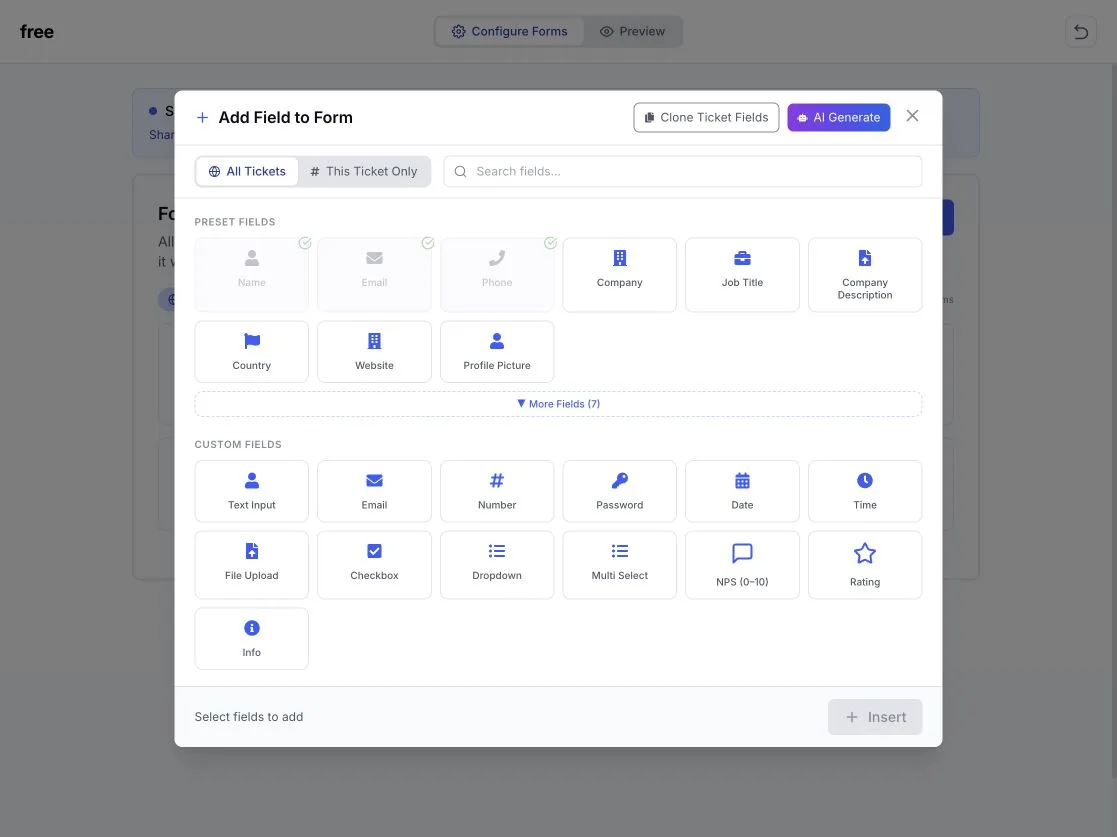
Each field can apply to all tickets or to a single ticket, so a free visitor pass and a paid conference pass can ask different questions on one event. Fields can be shown or hidden based on an earlier answer, the phone field can preselect the visitor’s country from their location, and hidden fields can record the UTM source, medium, campaign and referrer behind each registration, which replaces the “How did you hear about us?” question for tagged links.
On the ticket side, you can require organiser approval before a registration is confirmed and stop the same person registering twice for one ticket. Registrations can be exported to Excel, and attendees are checked in on the day by scanning their QR code with the EventHex scanner app. You can read more about ticket types and rules and QR check-in, or see how the AI form builder drafts a form from a short description.
Comparing tools before you commit? Our guide to choosing an event registration platform walks through pricing models and the questions to ask vendors.
Frequently asked questions
What should be included in an event registration form?
At minimum: name, email and the ticket or registration type. Most events also need a mobile number and a consent checkbox. Add event-specific fields, such as company and job title for business events or meal choice for dinners, only when someone on your team will use the answer.
How many fields should a registration form have?
There is no fixed number, but shorter is better. Free events can work with two or three fields. Paid conferences and trade shows typically need eight to twelve. If a field is not used for admission, badges, catering, safety or reporting, remove it or make it optional.
Should I ask for a phone number on an event registration form?
Ask for it when you will use it: day-of updates, WhatsApp reminders, or finding attendees at check-in. Use a country-code picker so international registrants enter it correctly. For free webinars, phone is usually unnecessary.
How do I collect different information for different ticket types?
Use a form builder that attaches fields to individual tickets, or use conditional logic that shows extra questions only when a specific ticket is selected. This keeps the form short for most people while still capturing what you need for VIP, speaker or exhibitor registrations.
Is a Word or PDF registration form template good enough?
Paper and PDF forms work for very small, offline events. For anything you promote online, an online form is faster for attendees, removes manual data entry, and lets you send confirmations and tickets automatically.
How do I know where my registrations came from?
Add tracking tags (UTM parameters) to the links you share in emails, social posts and ads, and use a registration form that records them. That tells you which channel drove sign-ups without asking attendees. Our guide on how to promote an event covers which channels to tag.
Turn your template into a live registration page
Pick the template closest to your event, cut it down to the fields you will really use, and put the ticket choice near the top. If you want one place to build the form, sell tickets, approve registrations and check people in on the day, book a demo of EventHex and we will walk through it with your event in mind.